
What Is Microsoft Defender EASM?
Microsoft Defender External Attack Surface Management (EASM) is a cybersecurity solution designed to secure digital environments by managing the external attack surface. This tool provides visibility into assets visible to potential attackers.
Defender EASM supports security postures by uncovering hidden threats and vulnerabilities. As organizations grow, their digital footprint increases. Microsoft Defender EASM aids in managing these assets, ensuring they are monitored and protected against external threats.
Key Features of Microsoft Defender EASM
Microsoft Defender External Attack Surface Management (EASM) offers the following capabilities:
- Discovery and inventory: Helps identify assets connected to the organization, including previously unknown or unmonitored ones. The discovery process includes domains, IP blocks, hosts, email contacts, ASNs, and WHOIS organizations. It indexes and categorizes these assets.
- Risk insight dashboards: Dashboards provide an at-a-glance view of the organization’s online infrastructure, highlighting critical risks such as vulnerabilities and compliance gaps.
- Asset management and custom filtering: Allows users to filter and customize the inventory view based on specific needs, such as isolating assets linked to deprecated infrastructure or identifying new cloud resources.
- Role-based user permissions: Owners and Contributors can create, modify, and delete resources, while Readers can only view data, maintaining strict control over sensitive information.
- Data residency and compliance: Microsoft adheres to strict compliance standards, with customer-specific data stored in regions chosen by the customer. Data retention policies ensure that customer data is securely deleted after 180 days if they cease to be a customer.
- Global and customer-specific data integration: Integrates global Microsoft data with customer-applied labels to offer a unified view of the attack surface.
How Microsoft Defender EASM Works
Microsoft Defender External Attack Surface Management (EASM) provides a systematic approach to identify and manage the assets within an organization’s external attack surface. Its discovery process ensures comprehensive visibility, addressing risks associated with unmonitored or unknown digital properties.
Here’s how it operates:
- Discovery capabilities: The system begins with “seeds,” which are known assets like domains, IP blocks, hosts, email contacts, ASNs, or WHOIS organizations. These seeds serve as starting points for recursive scans, identifying associated infrastructure and revealing additional assets that are connected to the organization.
- Recursive asset mapping: The discovery engine uses each seed to explore first-level connections, such as domains registered with the same contact email or hosts resolving to shared IP blocks. These connections expand into second-level and third-level links, creating a detailed map of the attack surface. The process continues until the system reaches the boundaries of assets the organization is responsible for managing.
- Automated and customized inventories: Organizations can start with prebuilt inventories derived from Microsoft’s existing data or create customized inventories using Discovery Groups. These groups allow users to manage seed lists and schedule recurrent discoveries, tailoring the process to their needs.
- Dynamic asset classification: Discovered assets are categorized into several states, including approved inventory, dependencies, candidate assets, “monitor only” assets, and items requiring investigation.
- Continuous monitoring: Once the inventory is populated, Defender EASM repeatedly scans the assets using virtual user technology. This process gathers data on asset behavior and content, uncovering vulnerabilities, compliance issues, and other risks.
- Unified management: All discovered assets are indexed in a centralized inventory, providing a dynamic system of record.
Tutorial #1: Create a Defender EASM Azure Resource
This guide explains how to set up a Microsoft Defender External Attack Surface Management (Defender EASM) Azure resource using the Azure portal. Instructions in this tutorial and the following one are adapted from the Defender EASM documentation.
Prerequisites
Before proceeding, ensure the following:
- You have an Azure subscription or have created a free Azure account.
- You hold a Contributor role in Azure.
- Familiarize yourself with the Azure portal.
Steps to Create a Defender EASM Azure Resource
- Create a resource group
- Log in to the Azure portal and select Resource Groups from the homepage.
- Click Create.
- Fill in the following Subscription, Resource Group, and Region fields.
- Click Review + Create to confirm the details and then select Create.
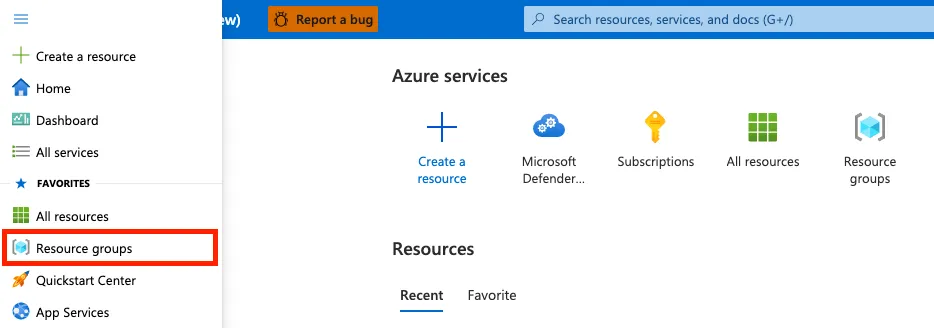
Source: Azure
- In the Azure portal search bar, type Microsoft Defender EASM and press Enter.
- From the results, click Create to start creating a Defender EASM resource.
- Fill in the Subscription, Resource Group, Name, and Region fields.
- Click Review + Create to validate the entries, and then select Create.
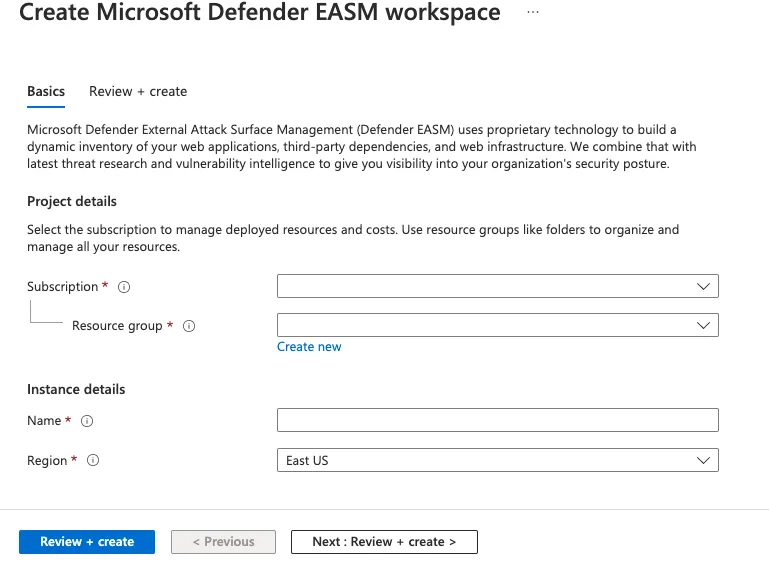
Source: Azure
Once the resource is successfully created, you can navigate to it and begin using Defender EASM to manage and secure your external attack surface.
Product Limitations
As you evaluate Microsoft Defender EASM, you should be aware of the following limitations, reported by users on the G2 platform:
- Complex setup and integration: Initial configuration and integration can be challenging, particularly for organizations with diverse IT environments. The learning curve for new users may require significant time and effort.
- Interface and navigation challenges: The user interface could benefit from enhancements to improve navigation and usability. Users sometimes report getting lost while navigating the tool, indicating a need for a more intuitive flow.
- Performance issues: The tool may experience slower performance during peak usage times, and its processing power and storage requirements can be high compared to similar solutions.
- False positives: Defender EASM occasionally generates false positives, requiring additional manual checks to validate findings. This can impact the efficiency of vulnerability management processes.
- UI and data management enhancements needed: The data placement, filtering options, and overall user experience could be more refined to meet user needs effectively.
- Stability issues: Some users report occasional software bugs, especially following Windows updates, which can disrupt operations.
- Overblocking and configuration complexity: The solution can sometimes enforce overly simplistic blockings, potentially leading to unnecessary interruptions. Additionally, its configuration is perceived as more complex than competing tools.
- Cost considerations: While pricing is generally reasonable, it may be on the higher side for some organizations, especially smaller ones with limited budgets.

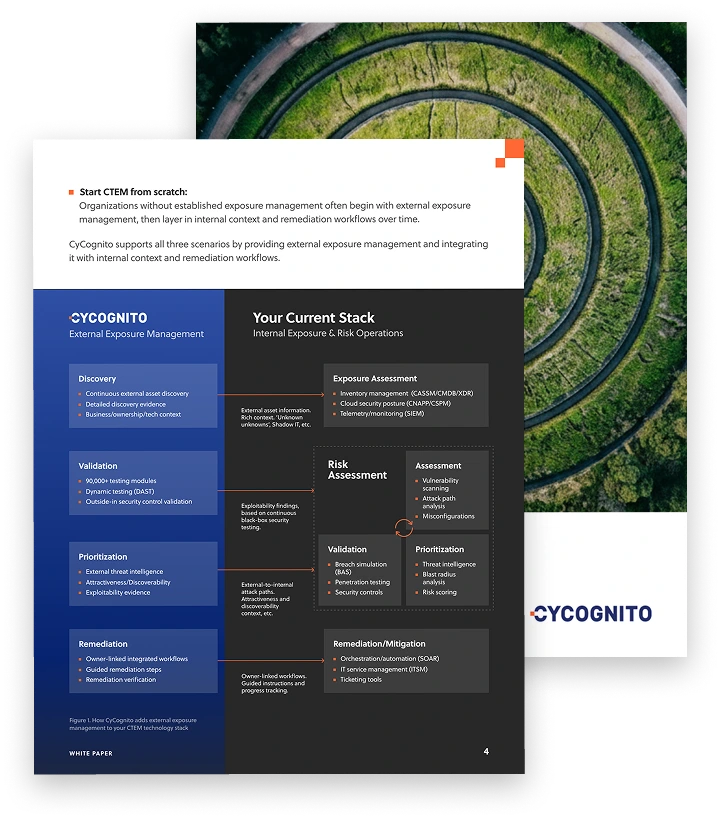
Operationalizing CTEM Through External Exposure Management
CTEM breaks when it turns into vulnerability chasing. Too many issues, weak proof, and constant escalation…
This whitepaper offers a practical starting point for operationalizing CTEM, covering what to measure, where to start, and what “good” looks like across the core steps.
Tutorial #2: Using and Managing Discovery with Defender EASM
This tutorial guides you through accessing and managing external asset discovery in Microsoft Defender External Attack Surface Management (EASM).
Step 1: Access Your Automated Attack Surface
- Locate your preconfigured attack surface:
- Open the Defender EASM instance and select Getting started under the General section.
- Use the search function to locate your organization’s attack surface from the list of preconfigured attack surfaces.
- Choose your organization from the list and select Build my attack surface. This initiates a background discovery process.
- Once the process begins, you will be redirected to the dashboard in Preview Mode, where you can explore initial insights about your infrastructure.
- Use the dashboard to examine discovered assets, vulnerabilities, and risks. This provides a comprehensive overview of your external attack surface.
Source: Microsoft
Step 2: Customize Discovery
Custom discoveries help you identify outlier assets or infrastructure linked to subsidiaries, acquired entities, or independent business units.
- Create a discovery group:
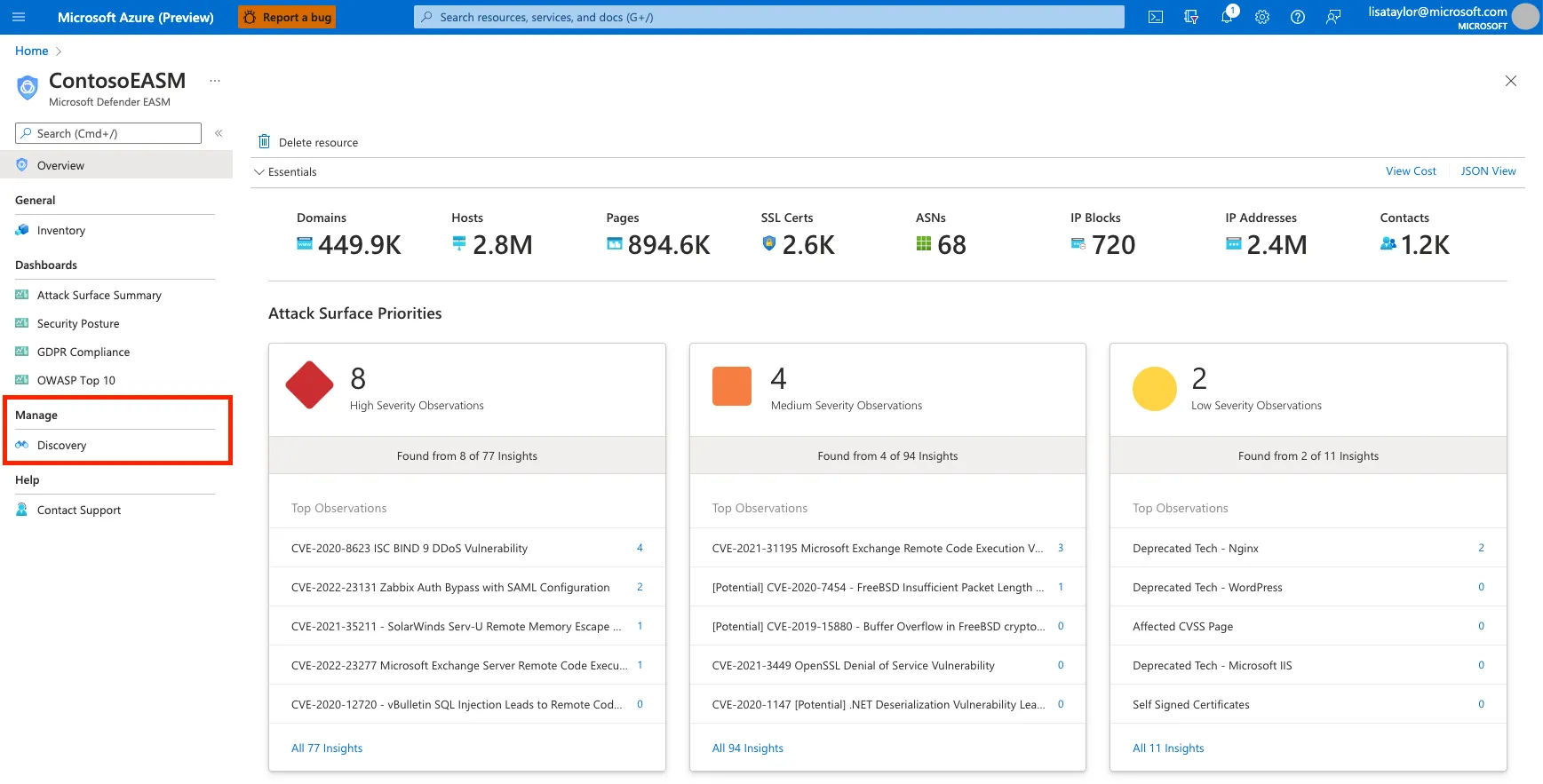
- Navigate to the Discovery section under the Manage menu in the left pane.
- Select Add discovery group to create a new group.
- Provide a name, description, and set the Recurring frequency. The default recurrence is Weekly, which is recommended for continuous monitoring. You can set it to Never for a one-time scan.
- Click Next: Seeds.
Source: Microsoft
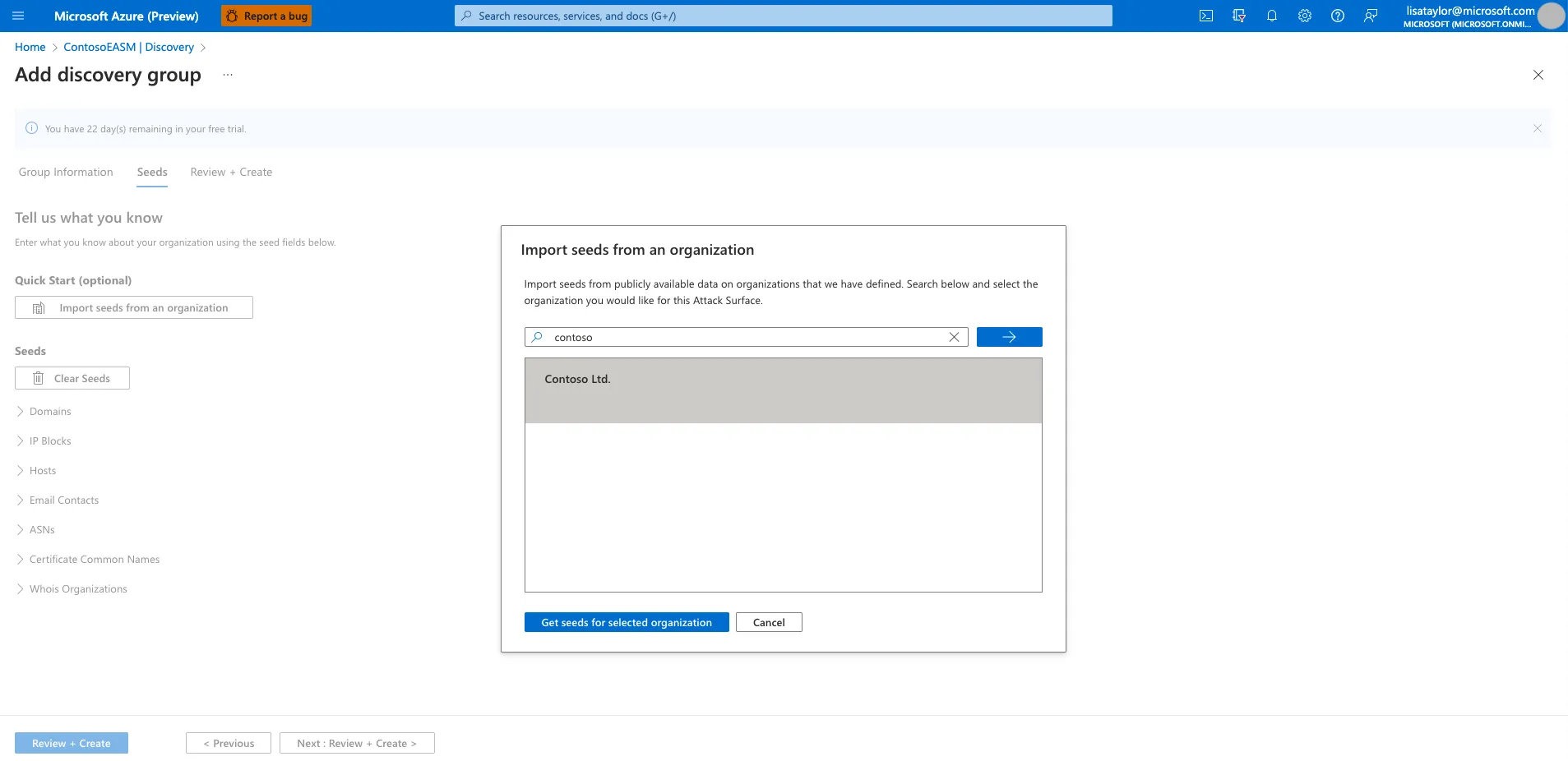
- Seeds represent known assets like domains, IP blocks, email contacts, or Whois organizations.
- Use the Quick Start option to search for preconfigured assets linked to your organization.
- Manually input assets in supported formats.
Step 3: Manage Discovery Groups
- View and edit groups:
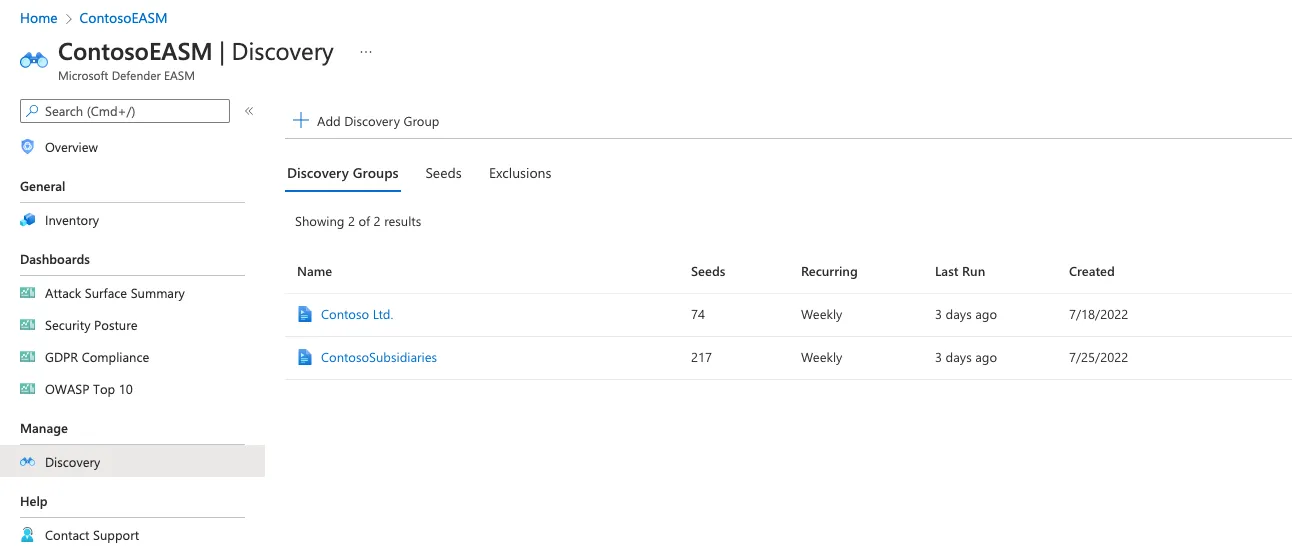
- The Discovery page displays a list of all discovery groups. For each group, you can view details, edit configurations, or initiate a new discovery run.
- Use the Run History section for insights on completed discoveries, including new assets added to your inventory.
- Use the Seeds tab to view all seed assets, their types, and associated discovery groups.
- Use the Exclusions tab to manage entities excluded from the discovery process.
Source: Microsoft
Asset Discovery Limitations
When using Defender EASM for discovery, you should be aware of these important limitations:
- Dependence on Seed Assets: The discovery process heavily relies on pre-knowledge and submission of known assets, such as domains, IP ranges, and email contacts, as seeds. This reliance makes it challenging to detect assets in unknown or unstructured organizational environments, particularly for IT security teams managing external attack surfaces.
- Lack of Organizational Context: Defender EASM does not provide robust organizational mapping or business context, which can hinder accurate asset classification and attribution. This limitation impacts the ability to tie assets to specific business units or subsidiaries effectively.
- Passive Scanning Techniques: The tool primarily utilizes passive scanning methods for vulnerability assessments. Active testing, which can provide more definitive insights into asset security and remediation effectiveness, is not supported.
- Weak Issue Prioritization: Risk prioritization relies on CVSS scores. This method may not fully account for context-specific risks, which can impact an organization’s ability to address the most critical vulnerabilities effectively.
- Lack of Remediation Validation: Defender EASM does not support active testing to validate whether remediation efforts have successfully mitigated identified risks. This limitation can leave organizations uncertain about the security state of their assets.
CyCognito: The Top Alternative to Microsoft Defender EASM
The CyCognito platform addresses today’s exposure management requirements by taking an automated multi-faceted approach in identifying and remediating critical issues based on their business impact, rather than focusing on the generic severity of the threat alone. To do this you need a platform that is continuously monitoring the attack surface for changes and provides intelligent prioritization that incorporates organizations context.
The CyCognito platform addresses today’s vulnerability management requirements by:
- Maintaining a dynamic asset inventory with classification of the entire external attack surface, including exposed on-premise and cloud-hosted assets like web applications, IP addresses, domains and certificates, eliminating the need to rely on outdated or incomplete information from collaboration tools, spreadsheets, or emails. This approach significantly reduces the burden of tedious, error-prone and costly processes.
- Actively testing all discovered assets to identify risk. Active testing, including dynamic application security testing, or DAST, uncovers complex issues and validates known issues, with low false positives. Each exploited asset is assigned a security grade based on its criticality to the business.
- Prioritizing critical issues, guiding security teams to focus on the most urgent threats. Our unique risk-based prioritization analysis goes beyond the common vulnerability scoring system (CVSS), and incorporates factors like asset discoverability, asset attractiveness, exploitability, business impact and remediation complexity. Integrated tactical threat intelligence identifies the handful of attack vectors that pose the greatest risk.
- Streamlining communications between remediation teams by providing comprehensive, verifiable evidence for each exploited asset. This evidence includes detailed risk assessments, asset ownership information, and actionable remediation guidance. The platform seamlessly integrates with SIEM, SOAR and ticketing system tools like Jira, ServiceNow and Splunk to facilitate information sharing and collaboration.
Learn more about the Cycognito Attack Surface Management Platform.